
Invisible characters can feel like magic, but they are just part of Unicode — the same system that gives us every letter, emoji and symbol on your screen. Understanding the basics makes the whole topic click, and helps you pick the right character instead of guessing. This is a friendly, non-technical introduction.
What is Unicode?
Unicode is a giant, agreed-upon list that assigns a unique number to every character in (almost) every writing system on Earth — Latin letters, Arabic, Chinese, emoji, mathematical symbols, and yes, several invisible characters. Each entry has a code written like U+0041, which is the capital letter A. Because every device agrees on this list, the character you copy on one phone shows up the same on another.
Where do invisible characters fit?
Among those tens of thousands of entries are characters that were never meant to have a visible shape. Some exist for technical reasons — to control how text wraps, to join scripts, or to act as placeholders. Others are spaces of various widths used in different languages. We have repurposed a handful of these as "invisible text", because they display as nothing yet count as real content.
The invisible characters worth knowing
| Name | Code | What it was made for |
|---|---|---|
| Space | U+0020 | The ordinary space (but apps trim it) |
| Zero-width space | U+200B | Allowing line breaks without a visible gap |
| Word joiner | U+2060 | Preventing a line break between words |
| Hangul Filler | U+3164 | A placeholder in Korean text entry |
| Ideographic space | U+3000 | A full-width space for CJK languages |
The Hangul Filler is the workhorse of blank usernames; the zero-width space is the choice for invisibly joining or splitting text.
Why your spacebar is not enough
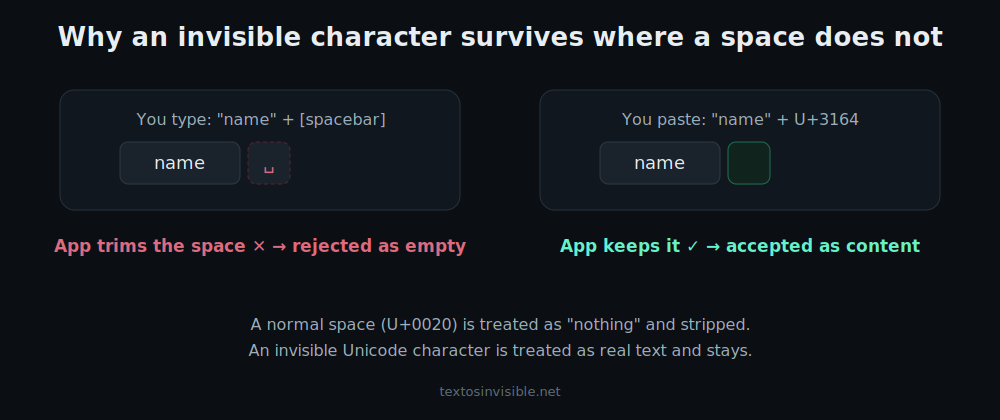
The normal space is technically a Unicode character too, but apps treat it as "no real content" and trim it. The other invisible characters were designed to be content, so apps keep them. That single design decision is the entire reason invisible-text tricks work. It is also why you cannot simply hold the spacebar to make a blank username — the app throws the spaces away before saving.
How encoding makes them portable
When you copy a character, your device stores its Unicode number, not a picture. The receiving app looks the number up and decides how (or whether) to draw it. This is why an invisible character survives being copied between apps and devices — everyone is reading from the same Unicode list. It is also why, very occasionally, an old device shows a box: that device's font simply has no entry to draw, though the character is still there underneath.
Width vs shape: a subtle but useful distinction
People say "invisible" to mean two different things. Some characters have no shape but still take up width (the ideographic space is actually quite wide). Others have neither shape nor width (the zero-width space). This matters in practice: a username filter that rejects truly zero-width characters may happily accept the slightly-wide Hangul Filler, which is exactly why it is the most reliable choice for game names. If you only remember one thing, remember that width is the property that decides whether a character survives a filter.
Are they safe?
Completely. They are ordinary standardised characters, not code, not scripts, and they cannot harm a device or account. The only caution is social, not technical: do not use them to deceive, spam, or evade filters on platforms that forbid it. Used for formatting and presentation, they are entirely above board.
Detecting hidden characters
Because some of these characters are completely invisible, they occasionally end up in text without you realising — copied from a website, a PDF, or a code snippet — and then a form rejects your input for no visible reason. Our detector tool (Method 3 on the home page) scans any text, tells you how many hidden characters it contains, and strips them out in one click. It is worth knowing about even if you never generate invisible text yourself.
Putting it into practice
Now that you know what they are, the tools make more sense. The count generator gives you a precise number of one character; the converter matches a length; the detector finds and removes hidden ones; and the Unicode table lets you copy a specific code when an app is fussy. Pick the character that fits the job, and you will spend far less time guessing.
Recap
Unicode assigns a number to every character, including a handful of invisible ones. They work because, unlike the spacebar's space, apps treat them as real content. Knowing the main five — and that the Hangul Filler suits usernames while the zero-width space suits joining text — is enough to use them confidently anywhere.